
Quick Answer: Rental eCommerce Platform Development Cost
Rental eCommerce platform development cost usually starts around $35,000 to $70,000 for a focused single-vendor MVP, moves into the $70,000 to $160,000 range for a serious rental operation with real-time availability, payments, deposits, admin workflows, pickup or delivery, and return handling, and can exceed $180,000 to $300,000+ for a multi-vendor rental marketplace, multi-location fleet, native mobile apps, custom logistics, ERP integrations, or advanced analytics.
The useful estimate is not based on screen count. It is based on the rental operating model. In a normal store, inventory is sold once and leaves the system. In rental commerce, the same item returns, may require inspection, may need cleaning or maintenance, may move between branches, may be held for a future booking, and must not be double-booked for overlapping dates. That cycle is what makes rental commerce more expensive than a generic cart and checkout build.
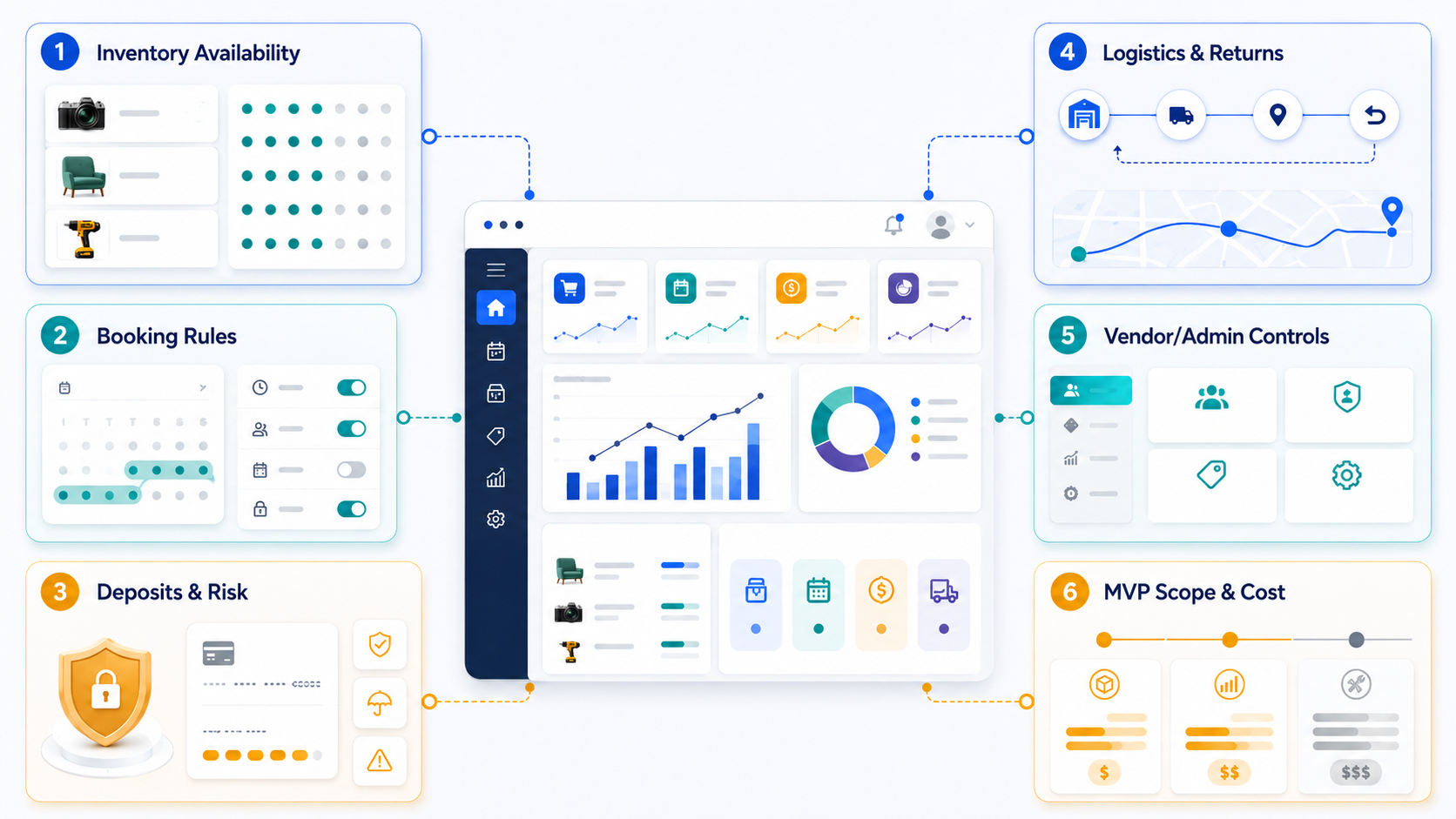
This guide is for founders, rental business owners, marketplace operators, and product teams planning equipment rental, furniture rental, fashion rental, electronics rental, vehicle rental, event rental, outdoor gear rental, or any product where availability, booking windows, deposits, delivery, and returns matter. If you already know your first-release workflow, run it through the Custom Software Cost Estimator. If the launch scope is still too broad, use the MVP Scope Builder before asking for a fixed quote.
Why Rental Commerce Costs More Than Generic eCommerce
A rental platform has the storefront work of eCommerce plus the operational logic of scheduling, inventory, payments, service management, and exception handling. Modern rental tools commonly advertise online bookings, stock calendars, deposits, payment capture, documents, customer records, reporting, barcode or QR scanning, delivery workflows, and return processing. Those features exist because rental businesses lose margin when availability is wrong, deposits are mishandled, pickup windows are missed, or damaged items are returned without evidence.
The estimate should therefore start with workflow questions, not only feature names:
- Are items tracked as bulk stock, serialized assets, or both?
- Can the same item support hourly, daily, weekly, monthly, and long-term pricing?
- Do bookings need buffers for cleaning, inspection, charging, reset, or transport?
- Are deposits fixed, percentage-based, item-specific, pre-authorized, or refundable after inspection?
- Will orders use pickup, local delivery, shipping, installation, route planning, or crew scheduling?
- Is this a single rental brand, franchise, multi-location fleet, or multi-vendor marketplace with payouts?
For broader commerce context, compare this with eCommerce app development cost. The rental version adds time-based stock, return states, operational evidence, and risk controls on top of normal catalog, cart, checkout, and account features.
Rental Platform Cost Bands By Scope
Use these bands for planning language, not as guaranteed quotes. The right number depends on UX depth, platform choice, integrations, data migration, test coverage, and how much rental logic must be custom.
| Scope | Typical Cost Band | Typical Timeline | Best Fit |
|---|---|---|---|
| Lean Single-Vendor MVP | $35,000-$70,000 | 8-12 weeks | One rental business validating online booking, basic inventory, checkout, deposits, and admin order handling. |
| Operational Rental Platform | $70,000-$160,000 | 3-5 months | Rental operators that need availability calendars, pricing rules, delivery or pickup, returns, damage notes, reporting, and staff workflows. |
| Multi-Location Or Mobile-Enabled Platform | $120,000-$220,000 | 4-7 months | Businesses with branch-level inventory, staff roles, mobile check-in and checkout, barcode or QR scans, notifications, and deeper integrations. |
| Multi-Vendor Rental Marketplace | $180,000-$300,000+ | 6-9+ months | Marketplaces with vendor onboarding, renter and vendor messaging, commissions, split payouts, trust and safety, disputes, and admin moderation. |
If your platform is closer to a marketplace than a single rental store, read the companion guide on marketplace app development cost. Vendor dashboards, payout rules, dispute workflows, identity checks, moderation, and liquidity measurement change both architecture and QA effort.
Cost Driver Map For Rental Platforms
The cost drivers below are the levers that most often move a rental build from a small MVP into a production platform. Treat them as estimation inputs. If a vendor quotes without asking about these areas, the estimate is probably hiding assumptions.
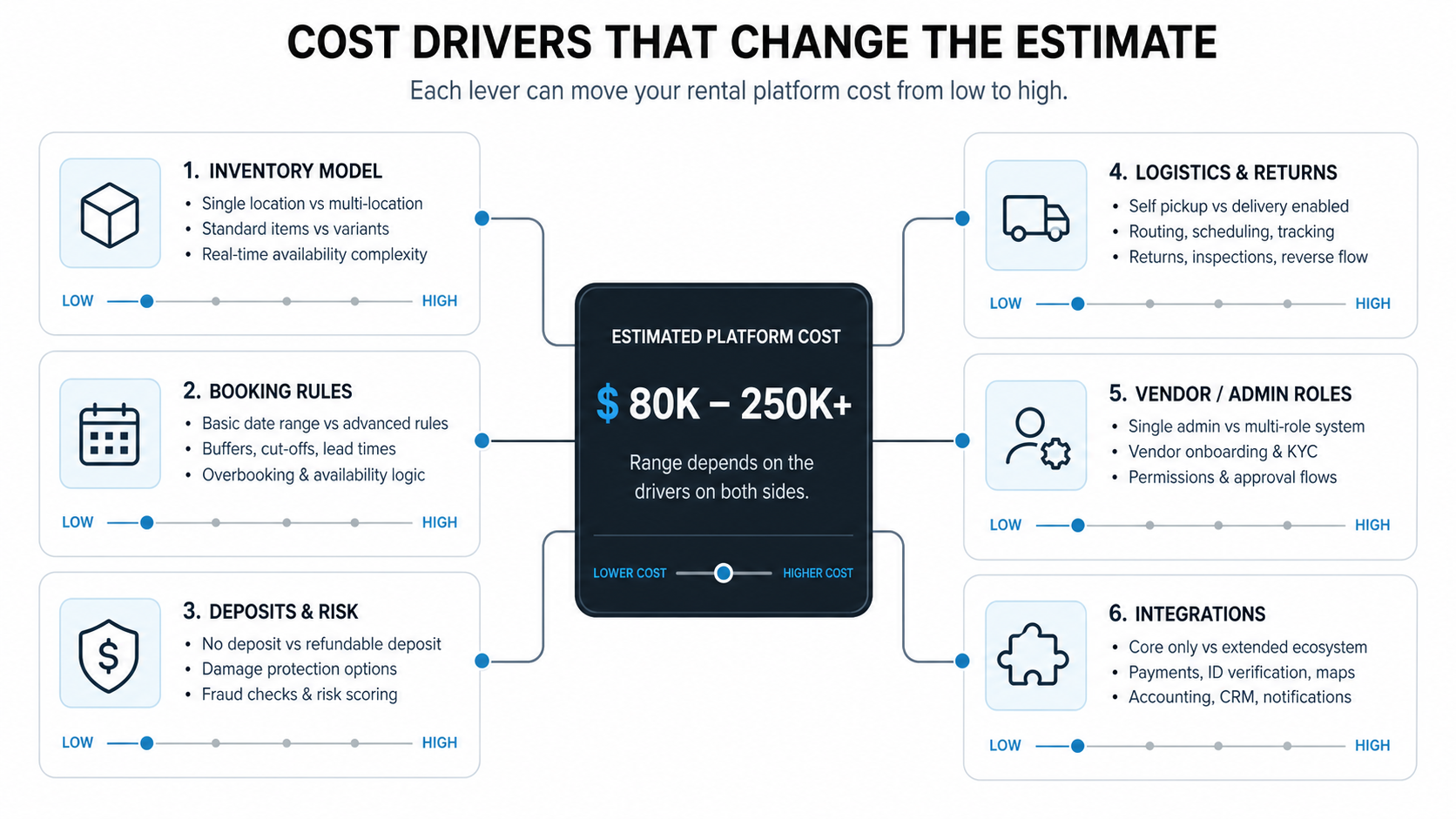
| Cost Driver | Lower-Cost Version | Higher-Cost Version |
|---|---|---|
| Inventory Model | Quantity-level stock in one location. | Serialized assets with condition, location, maintenance, and usage history. |
| Booking Rules | Simple date range and fixed rental periods. | Partial-day rentals, buffers, blackout dates, recurring bookings, substitutions, and manual approval. |
| Deposits And Risk | Fixed deposit and simple refund. | Pre-authorization, insurance, ID checks, damage claims, late fees, cancellation rules, and audit trails. |
| Logistics And Returns | Pickup only with manual staff handling. | Delivery windows, route planning, installation, proof of handoff, inspection, and reverse logistics. |
| Vendor And Admin Roles | One admin team controls all inventory and orders. | Vendor onboarding, branch managers, warehouse staff, finance, support, permissions, approvals, and moderation. |
| Integrations | One payment gateway and email notifications. | ERP, CRM, accounting, maps, shipping, e-signature, identity, analytics, support desk, and warehouse tools. |
Booking To Return Workflow
The core workflow is where rental software differs from a normal eCommerce app. A customer does not just buy an item. They reserve a time window, pay a deposit or pre-authorization, receive or pick up the asset, use it, return it, and then wait for inspection, refund, or fee adjustment. Each state creates edge cases that need product design, backend logic, admin visibility, and QA coverage.
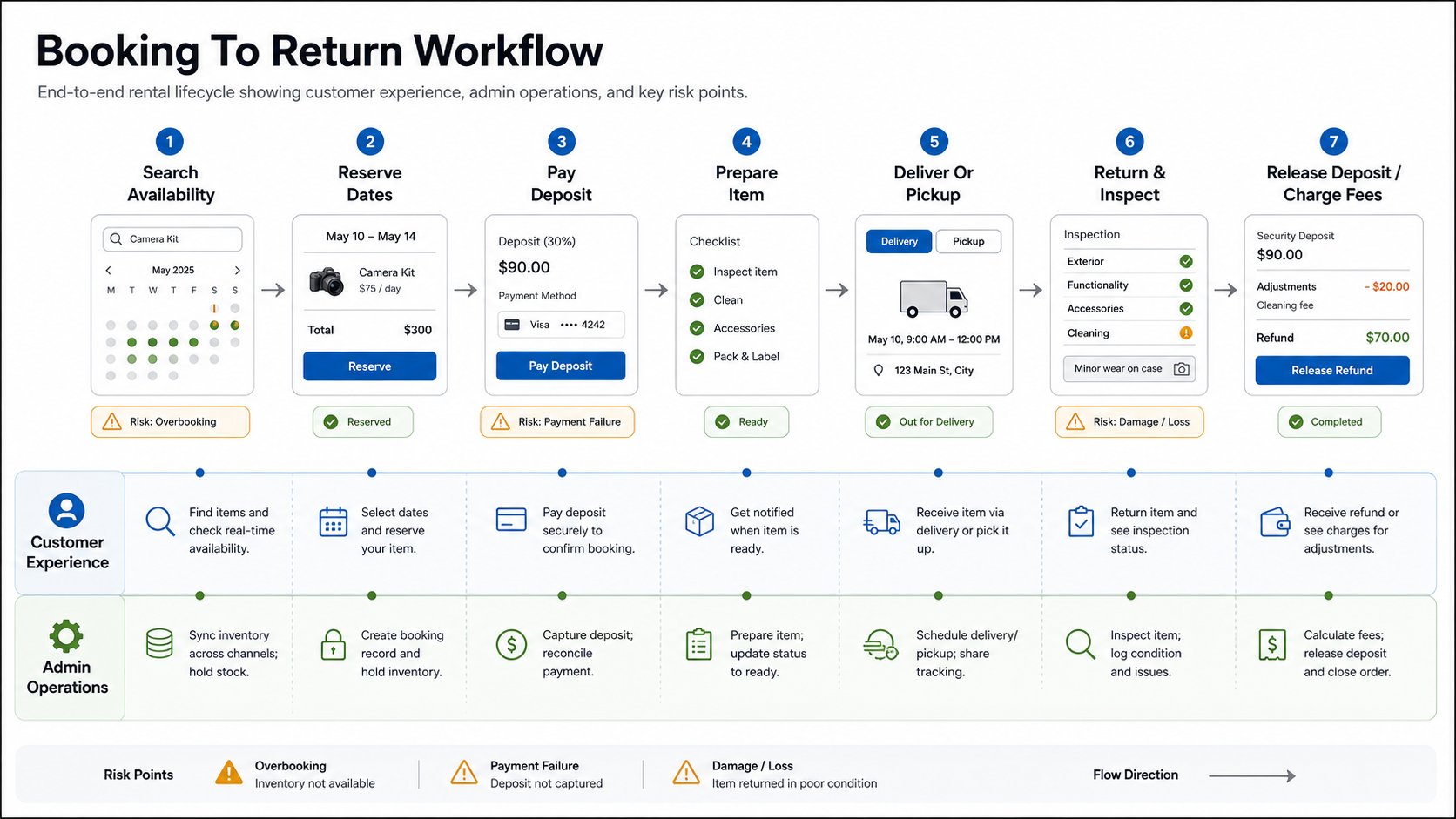
A practical estimate should separate customer experience from admin operations. Customers need clear dates, pricing, deposit terms, pickup or delivery information, reminders, return expectations, and refund visibility. Staff need stock holds, preparation tasks, handoff evidence, inspection notes, fee adjustments, cancellation handling, and reporting. If either side is missing, the launch may look polished but create manual work behind the scenes.
Fulfillment-heavy rental products should also study order-flow planning. The guide on eCommerce order fulfillment automation is useful for thinking through status changes, exception queues, handoffs, and operational dashboards that become important once volume grows.
A Practical MVP Scope For Rental eCommerce
A strong rental MVP should prove the core booking and fulfillment loop without trying to automate every edge case. For many operators, release one should include:
- Customer-facing catalog with item details, photos, pricing, and availability search.
- Booking flow with dates, quantity or asset selection, add-ons, deposit, checkout, and confirmation.
- Admin dashboard for inventory, bookings, customer records, order status, manual adjustments, and basic reporting.
- Pickup or delivery settings for the first operating region.
- Return workflow with condition notes, late fee or damage handling, and deposit release process.
- Notifications for booking confirmation, reminders, pickup, return, payment, and cancellation.
Push advanced analytics, full route optimization, complex loyalty, multi-warehouse transfers, native apps, and vendor marketplace tools into later phases unless they are required to prove the business model. A smaller release is not weaker if it proves the rental loop safely. It gives the team real evidence before investing in automation.
If the business model is already multi-sided, use the Build vs Buy Decision Tool as a first filter. It helps separate commodity workflows that can be bought from strategic workflows that deserve custom software.
Architecture Decisions That Affect Budget
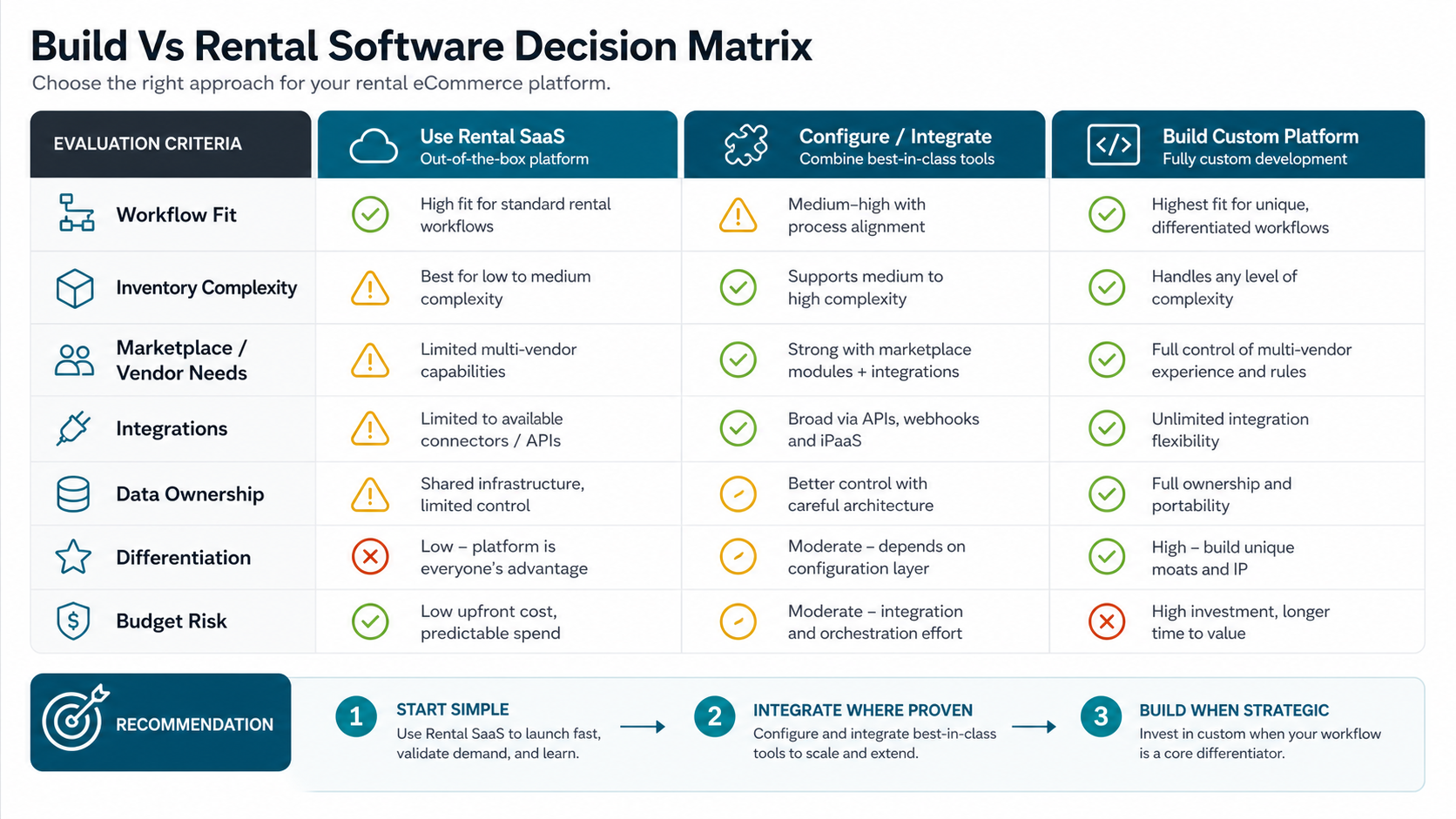
The biggest technical decision is whether to extend existing rental or eCommerce software, configure and integrate several tools, or build a custom application. Off-the-shelf rental software can be enough when your workflows match its assumptions. A custom platform makes more sense when the rental rules are your differentiation, when vendor operations are complex, or when your data must connect deeply with internal systems.
| Decision | Lower-Cost Option | Higher-Control Option | Budget Impact |
|---|---|---|---|
| Storefront | Template storefront or headless commerce theme. | Custom responsive web app or PWA. | Custom UX adds design and frontend engineering but improves conversion for complex rentals. |
| Inventory | Quantity-level stock. | Serialized assets with QR/barcode, condition, maintenance, and location history. | Serialized assets require stronger data modeling and operations UI. |
| Payments | Standard checkout and fixed deposits. | Pre-authorization, split payouts, refunds, claims, late fees, and vendor settlement. | Payment edge cases increase backend and QA work. |
| Logistics | Pickup only or simple delivery zones. | Dispatch, route planning, installation, driver tasks, proof of delivery, and return inspection. | Operational apps and scheduling rules add complexity. |
| Marketplace | Single vendor and single admin team. | Vendor onboarding, dashboards, payouts, commissions, disputes, and moderation. | Marketplace workflows can double the product surface. |
For more general budget drivers, compare the rental platform against web app development cost and custom software development cost. The same principle applies: workflows, roles, integrations, security, and QA matter more than the number of screens.
When To Use Rental Software, Configure, Or Build
Use existing rental software when you need to get online quickly, your pricing and inventory workflows are standard, and your team can adapt to the vendor's process. This is often the right first move for small rental businesses with simple product types and no marketplace ambition.
Configure or integrate when the core rental workflow is mostly standard but you need a better storefront, custom reporting, CRM or accounting integration, migration from spreadsheets, a mobile-friendly booking layer, or a branded customer portal. This middle path can work well when the rental workflow is not your core IP but the connected customer experience matters.
Build custom when your rental model is strategically different: multi-vendor operations, unusual availability rules, high-value asset controls, regulated items, complex logistics, regional branch operations, custom finance rules, or data that must flow through ERP, warehouse, fleet, or accounting systems. A custom build is also easier to justify when the platform itself is the product, not just a back-office tool.
NextPage's StayHaven vacation rental marketplace case study is a useful adjacent example because it shows the marketplace surface behind search, property discovery, booking requests, host listing management, owner review, and admin operations.
Integration And Data Migration Planning
Rental businesses often start in spreadsheets, POS tools, accounting systems, legacy booking software, or disconnected calendars. The platform budget changes when the project must clean and migrate product records, asset IDs, booking history, customer records, deposits, contracts, images, location data, maintenance history, and vendor data. Data cleanup can be a small import task or a full migration project depending on quality.
Integration planning should name system ownership. Which system owns inventory? Which system owns payments? Where do invoices, refunds, and damage charges reconcile? Which staff team can override a booking? Which data must be visible to support? The WooCommerce product data migration guide gives a useful pattern for reconciling product, inventory, customer, order, and integration data before launch.
If the rental platform has checkout complexity, deposits, add-ons, coupons, or recurring customers, the eCommerce checkout optimization checklist can help keep payment UX and support paths from becoming afterthoughts.
Rental Platform Estimation Checklist
Before asking for a quote, prepare answers to these questions:
- What rental categories will launch first, and which can wait?
- Are items quantity-based, serialized, or both?
- What pricing periods, buffers, and blackout rules are required at launch?
- How are deposits, late fees, damage charges, cancellations, and refunds handled?
- Do customers pick up, receive delivery, use shipping, or need installation?
- What staff roles need dashboards on day one?
- Will vendors manage their own inventory and payouts?
- Which systems must integrate before launch?
- What data must be migrated from spreadsheets, POS, ERP, or existing software?
- What reports are needed for daily operations versus later management analytics?
- What evidence proves a booking was fulfilled, returned, inspected, and closed correctly?
The better your answers, the easier it is to avoid vague estimates. A useful software partner should turn these answers into release-one scope, later-phase scope, risks, assumptions, and a test plan, not just a feature list.
How NextPage Helps Plan Rental Platforms
NextPage scopes rental eCommerce platforms by mapping the operational model first: inventory states, booking rules, deposit and payment flows, logistics, user roles, integrations, reporting, QA, and rollout risk. From there, we identify the smallest release that can take real bookings safely and the later phases that can wait until usage proves the model.
If you are comparing rental software, custom development, or a marketplace build, start with the Custom Software Cost Estimator. If you already know the platform idea but need to reduce launch risk, use the MVP Scope Builder. For teams that need the full product planned and built, NextPage can help with web app development, eCommerce web app development, custom software development, integrations, QA, and production rollout.