
Quick Answer: WooCommerce Product Data Migration
WooCommerce product data migration is the process of moving catalog records, SKUs, variants, attributes, categories, prices, inventory, images, customers, orders, coupons, reviews, and connected-system keys from an existing store into WooCommerce with enough validation that the new store can sell, fulfill, report, and support customers without data confusion.
The migration is not finished when products appear in WordPress. It is finished when catalog managers can update items, buyers can find the right variant, checkout uses the correct price and tax class, operations can fulfill orders, support can read customer history, and external systems such as ERP, CRM, shipping, accounting, email, analytics, or marketplaces reconcile with WooCommerce.
If you need the full launch sequence around redirects, checkout, QA, and rollback, start with the WooCommerce migration checklist. This guide goes deeper on product data mapping, order history decisions, media handling, API/CSV migration options, and reconciliation evidence.
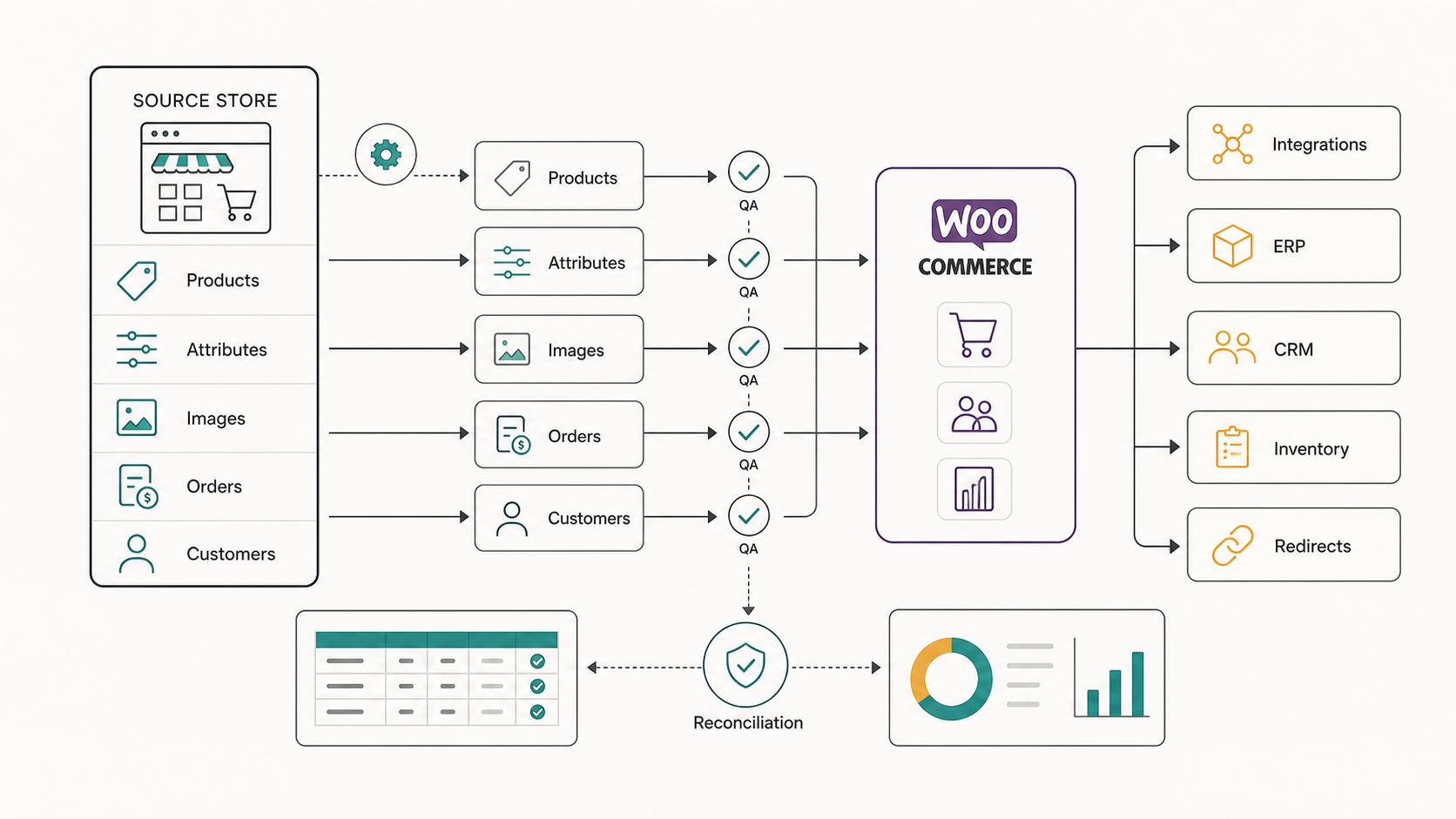
What Product Data Actually Moves Into WooCommerce?
Most teams say product migration when they mean a wider commerce data move. Product records are the center, but the surrounding data decides whether the migrated catalog works for real customers and operations teams.
| Data Area | Examples | Why It Matters |
|---|---|---|
| Product identity | SKU, product ID, parent-child relationships, handles, slugs, GTIN/MPN fields | Prevents duplicate products, broken variant relationships, and reporting mismatch. |
| Catalog structure | Categories, tags, brands, collections, filters, product types | Keeps navigation, search, feeds, and merchandising usable. |
| Attributes and variants | Size, color, material, bundle rules, configurable options, subscriptions | Protects buyer choice and inventory accuracy for variable products. |
| Commercial fields | Price, sale price, tax class, stock, weight, dimensions, shipping class | Controls checkout, tax, fulfillment, and margin reporting. |
| Media and content | Images, galleries, alt text, descriptions, PDFs, downloadable files | Preserves product trust, SEO value, and support documentation. |
| Customer and order data | Profiles, addresses, consent fields, order totals, refunds, statuses | Lets support, loyalty, reporting, and retention workflows continue. |
| External keys | ERP item codes, CRM IDs, warehouse IDs, marketplace IDs, feed IDs | Allows WooCommerce to keep syncing with the systems that run the business. |
The safest scope separates must-migrate data from archive-only data. A recent product, active customer, open order, and high-traffic category usually deserve more care than a dormant coupon, discontinued SKU, or old campaign tag.
Start With A Source Data Audit
Before exporting anything, build a source data inventory. List the current platform, database access options, apps that own product fields, custom fields, active integrations, media storage, product count, variant count, order count, customer count, and any records that have legal or support implications.
Then look for data quality problems that will become WooCommerce problems if you migrate them blindly: duplicate SKUs, missing parent products, inconsistent attribute names, uncompressed or missing images, orphaned variants, broken category paths, retired products still in feeds, unstandardized tax classes, incomplete addresses, and unsupported product types.
For complex stores, take a sample set before the full migration. Include the hardest products: variable products, bundles, subscriptions, downloads, products with many images, products with custom attributes, products with historical orders, and products connected to ERP or marketplace IDs. For wider launch planning, keep the source audit connected to the WooCommerce migration checklist and the broader composable commerce migration roadmap so redirects, checkout, QA, and rollback are not separated from the data work.
Build A Field Mapping Matrix Before Import
A field mapping matrix turns vague migration scope into an implementation plan. Each source field should have a WooCommerce destination, transformation rule, owner, sample value, validation check, and fallback decision.
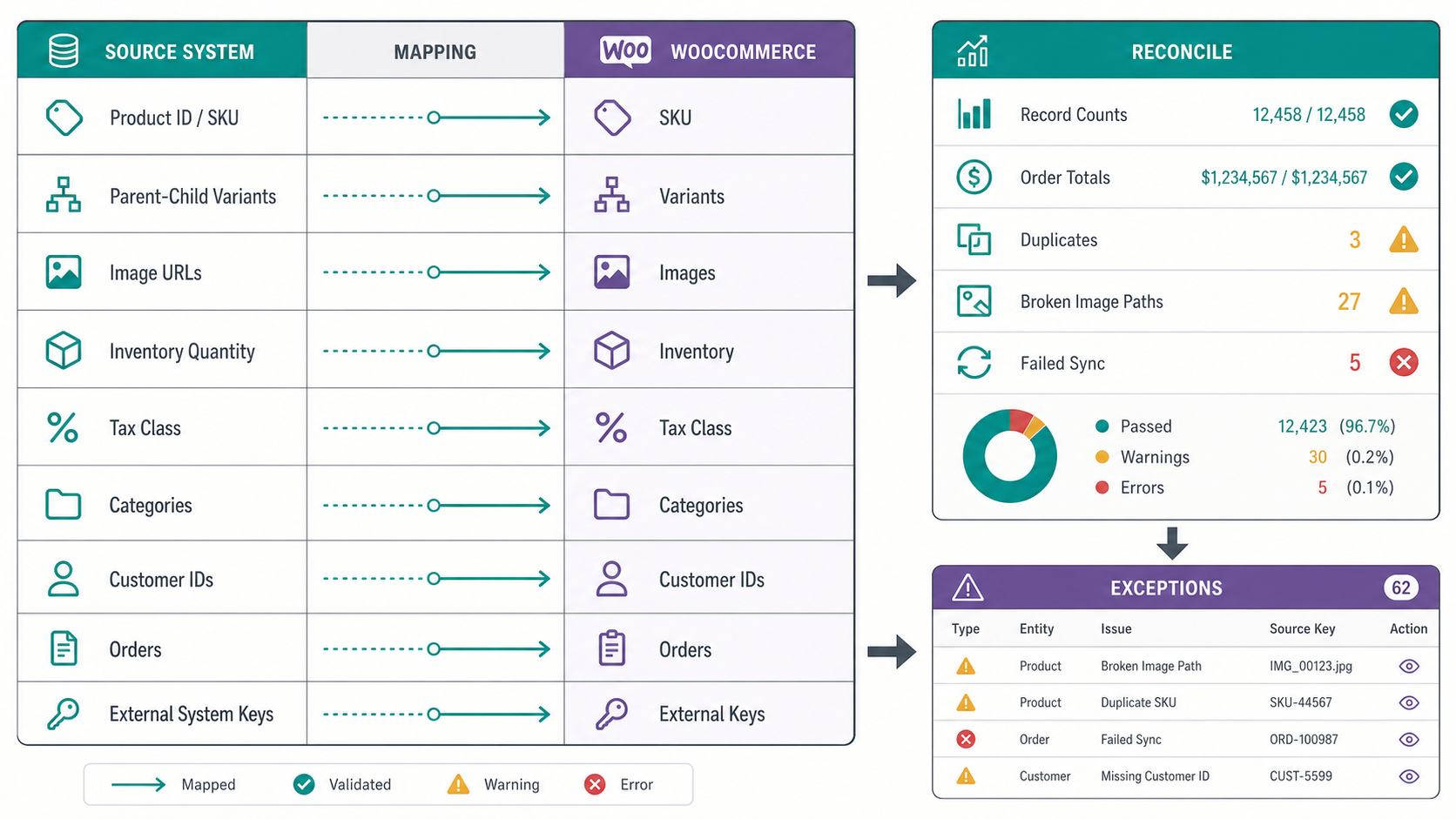
| Source Field | WooCommerce Destination | Migration Decision |
|---|---|---|
| Product ID | Imported metadata or external reference | Keep it for reconciliation instead of replacing WooCommerce IDs. |
| SKU | Product SKU | Require uniqueness unless the business deliberately uses shared SKUs. |
| Variant options | Global or custom attributes | Normalize names before import so Color, colour, and Shade do not fragment filters. |
| Image URL | Media library attachment and gallery | Download, optimize, attach, and validate missing or blocked URLs. |
| Inventory | Stock quantity, stock status, backorder rule | Decide whether WooCommerce or ERP is the source of truth after launch. |
| Customer ID | User account metadata | Preserve old IDs for support lookup and CRM matching. |
| Order status | WooCommerce order status | Map source statuses to WooCommerce statuses and keep raw source status for history. |
Do not treat custom fields as an afterthought. They may power filters, personalized bundles, shipping rules, reporting, warranties, marketplace feeds, or support workflows. If a field has no owner, decide whether to archive it, migrate it as metadata, or redesign the workflow.
Choose CSV, API, Plugin, Or Custom Pipeline By Risk
CSV import can work for a clean catalog with predictable fields. It is weaker when the migration includes frequent deltas, large media libraries, complex parent-child relationships, custom fields, historical orders, or integrations that need stable external IDs.
Plugin-based migration can accelerate common platform moves, but review what it actually migrates. Some tools handle products and images well but only partially handle customers, order notes, refunds, custom attributes, subscriptions, or app-specific fields.
API or custom pipeline migration is useful when the store has high order volume, complex transformations, ERP-owned inventory, marketplace sync, staged testing, or repeated rehearsal runs. This is where the work starts to look less like a WordPress task and more like software integration. The custom software development cost guide explains why business rules, integrations, auditability, and exception handling drive more effort than screen count.
Handle Product Images And Media As First-Class Data
Product images are often the slowest part of a migration because they depend on URL accessibility, filename quality, image size, CDN rules, gallery order, alt text, and attachment relationships. A product record with missing gallery images can pass a row-count check and still fail commercially.
Create a media migration checklist: source URL, destination attachment ID, product relationship, gallery order, alt text, file size, file format, broken download status, duplicate detection, and optimization status. Validate a sample manually and validate the full set with counts and error logs.
If product pages have PDFs, sizing charts, downloadable files, videos, or specification sheets, decide whether those assets live in the WordPress media library, object storage, a DAM, or the original vendor system. The answer affects backup, performance, permissions, and future editing workflows.
Decide How Much Customer And Order History To Move
Moving every historical record is not always the right choice. Support teams may need all order history, while a new WooCommerce checkout may only need active customers, open orders, recent orders, subscriptions, warranties, store credits, or loyalty balances.
Separate history into active operational data, customer-service history, reporting archive, and do-not-migrate data. Then decide how each group appears in WooCommerce. Imported orders may be read-only history, operational orders, or reporting-only records. Imported customers may need password reset flows, consent field review, CRM matching, or duplicate account cleanup.
CRM-heavy stores should also reconcile external IDs and ownership rules. If customer lifecycle, service cases, sales follow-up, or account history is more important than basic WooCommerce user records, use the custom CRM development cost guide and custom CRM development services scope to evaluate whether CRM customization or custom workflow logic is part of the migration.
Reconcile ERP, CRM, Inventory, And Marketplace Integrations
The new WooCommerce store must agree with the systems that manage inventory, fulfillment, customer communication, accounting, tax, product feeds, and marketplaces. Build an integration reconciliation plan before launch.
- ERP and inventory: confirm which system owns stock, cost, product master data, and purchase-order updates.
- CRM and email: validate customer IDs, consent fields, lifecycle tags, order triggers, and abandoned-cart events.
- Shipping and warehouse tools: test package data, dimensions, weights, address rules, labels, and tracking updates.
- Accounting and tax: compare order totals, taxes, refunds, discounts, and payment fees against source reports.
- Marketplace and product feeds: verify item IDs, categories, stock rules, image URLs, feed refresh timing, and rejection logs.
For budget framing, the Custom Software Cost Estimator can help model how integration count, user roles, admin workflows, and data complexity affect implementation effort. If the migration includes bespoke APIs, exception queues, approval states, or data audit trails, compare the scope with NextPage's custom software development cost and ERP integration cost guides before accepting a simple import estimate.
When To Use An API-Backed Migration Pipeline
CSV imports and migration plugins are useful when the catalog is clean, field rules are simple, and a one-time move is enough. They become risky when product data changes during the project, variants depend on custom logic, images need rewriting, orders must stay searchable, or WooCommerce has to reconcile with ERP, CRM, inventory, marketplace, accounting, or fulfillment systems.
Use an API-backed migration pipeline when the migration needs repeatable rehearsal runs, transformation logs, row-level error handling, delta sync, and evidence that business totals still match after each import. The pipeline should read from the source system, normalize fields, write to WooCommerce through approved APIs or importer jobs, attach media, update external keys, and produce a reconciliation report after every run. In 2026 planning, treat that report as the launch acceptance gate: product counts, variant relationships, image attachment counts, order totals, tax classes, customer IDs, ERP item codes, and failed rows should be reviewed before the final cutover decision.
| Signal | Why CSV/Plugin Import May Be Weak | Safer Pipeline Control |
|---|---|---|
| Large variant catalog | Parent-child products, attributes, and stock can drift across files. | Validate parent SKUs, attribute values, and inventory counts before each write. |
| Active orders during migration | A static export misses late orders, refunds, and customer updates. | Run delta syncs with timestamps, row counts, and order-status reconciliation. |
| ERP or inventory sync | External IDs can be lost or duplicated when fields are mapped manually. | Keep ERP item codes, warehouse IDs, and sync status in a migration audit table. |
| Custom media rules | Broken URLs, duplicate galleries, and missing alt text are hard to trace. | Download, attach, verify, and log media assets by product and variant. |
| High launch risk | Failed rows are easy to ignore until checkout, feeds, or support workflows break. | Use an exception queue with severity, owner, retry status, and go/no-go impact. |
For complex stores, pair WooCommerce migration services with broader data migration services so catalog cleanup, import tooling, reconciliation, and rollback evidence are planned together. When customer identity or ERP item masters are part of the move, bring CRM data migration services and ERP data migration services into the same acceptance plan. If the work includes custom dashboards, approval queues, or integration middleware, include ecommerce web app development in the scope instead of treating the migration as a content task.
Cutover Control Checklist For Migration Week
WooCommerce product data migration needs a controlled cutover window, not a last-minute import. Decide when catalog edits freeze, which records can still change, who approves the final delta export, and what evidence must be reviewed before DNS, checkout, feeds, and integrations move to the new store.
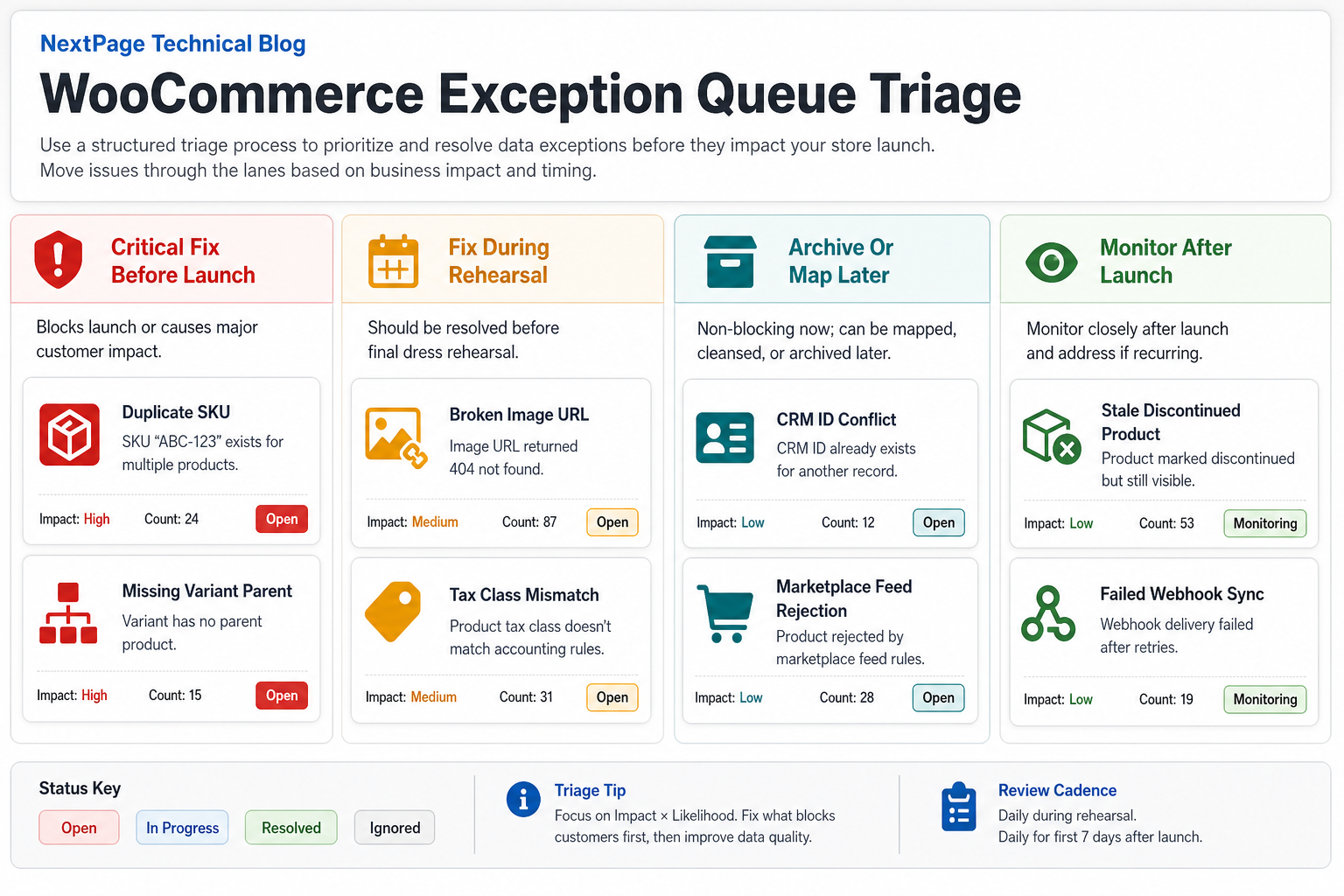
| Cutover Area | Decision To Make | Evidence To Keep |
|---|---|---|
| Catalog freeze | Which product, price, inventory, category, and media edits stop before the final export? | Freeze notice, exception list, and owner approval. |
| Delta export | How will changed SKUs, new customers, recent orders, and updated stock move after rehearsal? | Delta file hash, row counts, timestamp, and importer log. |
| Import run | Who starts the import, watches errors, and decides whether to pause? | Import duration, failed rows, retries, and transformed sample records. |
| Reconciliation | Which totals must match before launch: products, variants, images, orders, tax, refunds, inventory, and feed IDs? | Before/after counts, sample screenshots, sync logs, and finance checks. |
| Rollback | What event triggers rollback, and who owns source store, DNS, payment, and feed recovery? | Rollback runbook, owner list, and communication template. |
When the cutover includes admin workflows, approval queues, ERP sync, or custom dashboards, plan it as custom software development around operational continuity instead of treating it as a simple product import.
Validation Checklist Before Launch
Validation should produce evidence, not just confidence. Run automated checks where possible and manual checks where business judgment matters.
| Check | Evidence To Capture | Launch Risk If Missing |
|---|---|---|
| Record counts | Products, variants, categories, images, customers, orders, coupons | Silent data loss or duplicate records |
| Field samples | Before/after samples for complex products and edge cases | Wrong filters, pricing, or product configuration |
| Image audit | Missing image report, gallery order check, alt-text sample | Weak product pages and support complaints |
| Order totals | Source vs WooCommerce totals by sample order and date range | Reporting and finance mismatch |
| Integration sync | Successful sync logs, failed sync queue, retry behavior | Overselling, missed fulfillment, or CRM gaps |
| Checkout test | Payment, tax, shipping, coupon, refund, and email evidence | Revenue interruption after launch |
Broader commerce teams can also compare checkout, payment, and operating-cost assumptions in the eCommerce app development cost guide, especially when WooCommerce must connect to custom mobile, marketplace, or backend workflows. For launch evidence, treat checkout, payment, inventory, tax, and feed checks like a focused regression testing checklist; use the UAT vs functional testing vs regression testing guide to separate business signoff from release-risk coverage, and include functional testing services when revenue paths need independent verification.
Exception Queue Triage For Messy Catalogs
Every serious migration produces exceptions. The goal is not to hide them; it is to route them quickly so launch-critical problems are fixed before go-live while lower-risk cleanup is documented for after launch.
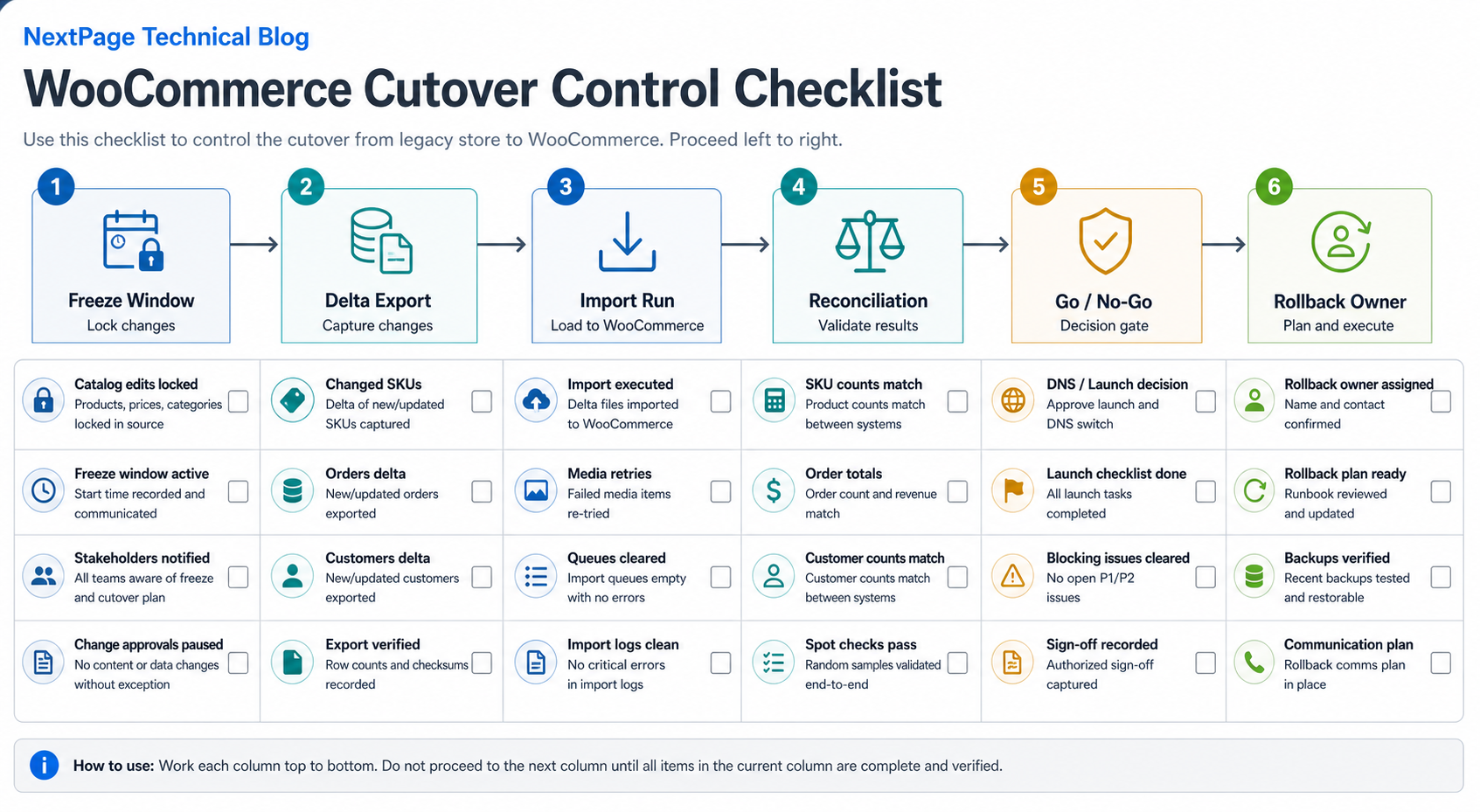
| Exception Type | Launch Decision | Owner |
|---|---|---|
| Duplicate SKU or missing variant parent | Fix before launch because product selection, stock, and reporting can break. | Catalog owner and migration engineer |
| Broken image URL or missing gallery order | Fix priority products before launch; queue long-tail media cleanup with a visible report. | Catalog owner |
| Tax class, shipping class, or weight mismatch | Fix before checkout opens because order totals and fulfillment can be wrong. | Commerce operations |
| CRM ID, loyalty, or consent conflict | Resolve active customers first; archive uncertain records when support can still search source history. | CRM or lifecycle owner |
| Marketplace feed rejection or failed webhook sync | Decide whether the channel can launch later or must be stable on day one. | Integration owner |
If WooCommerce becomes the public storefront while the real operating system spans inventory, support, finance, dashboards, and integrations, include web app development in the migration plan so internal teams can monitor exceptions after launch.
Common WooCommerce Product Data Migration Mistakes
- Only checking product counts. Counts do not prove that variants, images, prices, tax classes, and categories are correct.
- Ignoring old IDs. Source IDs are useful for reconciliation, support lookup, and external system matching even when WooCommerce creates new IDs.
- Letting attribute names fragment. Inconsistent attributes create poor filters and duplicate work for catalog teams.
- Moving order history without a business decision. Some orders should be operational, some should be read-only, and some should remain in an archive.
- Leaving integrations until the end. ERP, CRM, shipping, tax, feeds, and marketplace workflows determine whether the migrated data can run the business.
How NextPage Helps With WooCommerce Data Migration
NextPage helps ecommerce teams turn product migration into a controlled release plan. We can audit source data, map catalog fields, design migration rehearsals, handle WooCommerce import logic, validate images and variants, reconcile orders and customers, and test ERP, CRM, inventory, payment, shipping, and reporting workflows.
For a useful discovery call, bring your current platform, product count, variant count, order history needs, customer-account requirements, integration list, media storage details, launch window, and the workflows that must keep working on day one.