
Quick Answer: Dietary Customization In Pizza Delivery Apps
Dietary customization in a pizza delivery app is the set of menu, cart, checkout, and kitchen workflows that lets customers choose food safely around allergies, health goals, religion, lifestyle, or preference. It is more than a text box for special instructions. A reliable app needs structured ingredient data, clear allergen labels, smart substitutions, saved preferences, and operational safeguards so the restaurant can prepare the order correctly.
For pizza brands, this matters because the same product can change dramatically with crust, sauce, cheese, toppings, portion size, and preparation method. A vegan pizza, gluten-free pizza, low-sodium option, dairy-free order, or nut-allergy-sensitive order should not depend on guesswork. The app should guide customers to choices they can trust and give the kitchen a precise ticket.
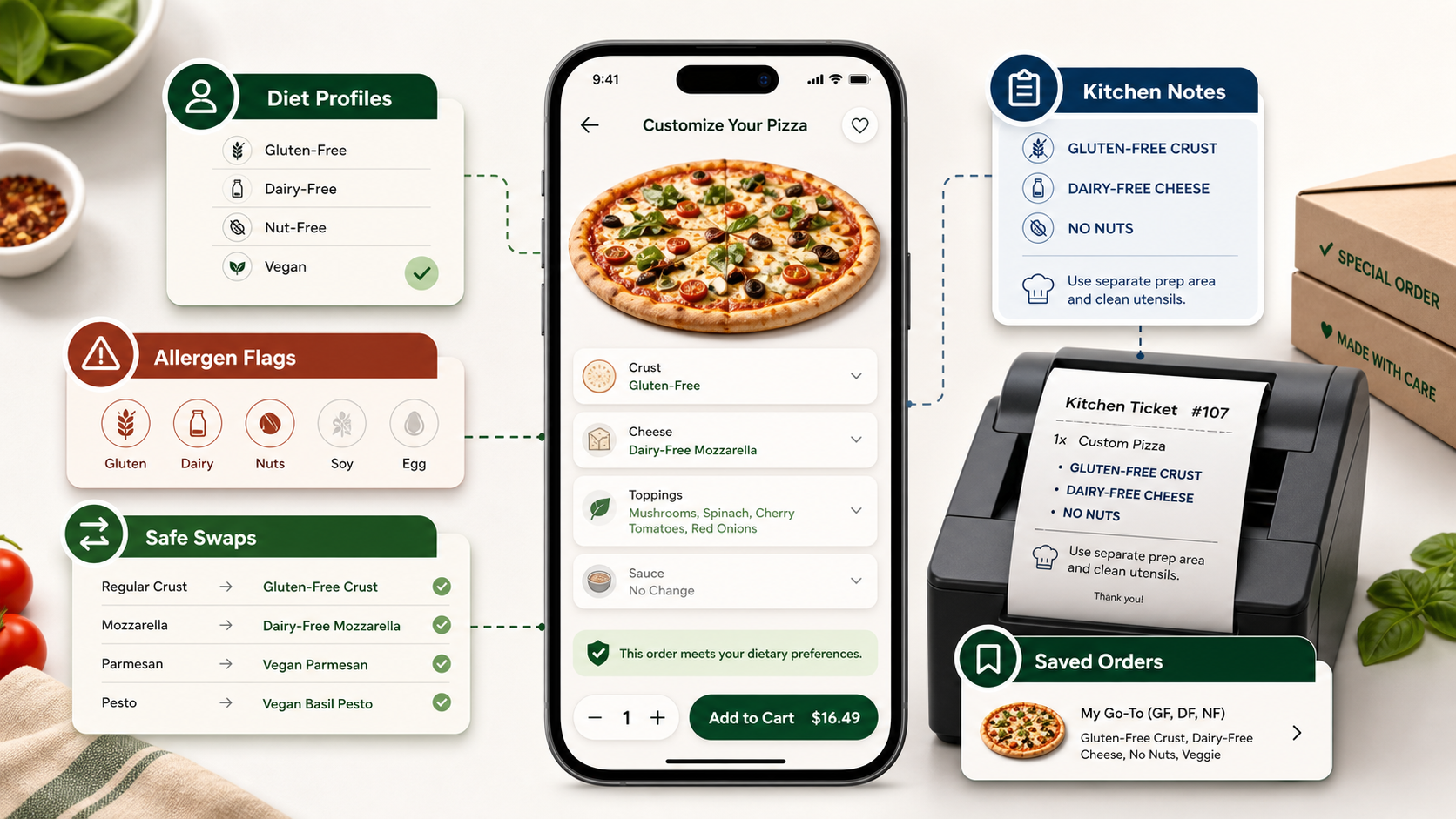
Why Special Dietary Needs Change The Product Requirements
A standard pizza ordering flow assumes that customers can browse a menu, choose toppings, and place an order with limited guidance. Special dietary needs change that assumption. Customers need to know what is safe, what can be substituted, what may involve cross-contact risk, and whether the restaurant can actually honor the request during a busy shift.
In the U.S., FDA consumer guidance recognizes milk, eggs, fish, crustacean shellfish, tree nuts, peanuts, wheat, soybeans, and sesame as major food allergens. Pizza apps may not replace food safety training or legal review, but they can make allergen and ingredient information easier to find, keep menus consistent across channels, and reduce risky free-text ordering.
The business upside is practical. Better dietary customization can increase conversion from families and groups, reduce abandoned carts, improve repeat orders, and protect brand trust. It also gives operators cleaner data about demand for vegan cheese, gluten-free crusts, dairy-free sauces, halal options, low-carb bases, or other specialty ingredients.
Core Features For Dietary Customization
The best feature set combines customer-facing clarity with back-office control. The app should not simply add more choices. It should make the safe choice easier to understand.
| Feature | Customer Value | Operational Requirement |
|---|---|---|
| Diet and allergen filters | Customers can narrow the menu to vegan, vegetarian, gluten-free, dairy-free, nut-free, or other relevant options. | Every item needs structured dietary and allergen tags maintained by the menu team. |
| Ingredient-level customization | Customers can remove, replace, or add toppings without unclear instructions. | Rules must block incompatible swaps and update price, nutrition, and preparation notes. |
| Allergen warnings | Customers see risk before checkout instead of discovering it after ordering. | The app needs cross-contact notes, disclaimers reviewed by the business, and kitchen escalation rules. |
| Saved dietary profile | Repeat customers do not need to rebuild the same safe order every time. | Profiles must be editable, permission-aware, and applied consistently across web and mobile. |
| Kitchen ticket clarity | Restaurant staff receive specific preparation notes instead of vague comments. | POS and kitchen display integrations must preserve dietary flags and customizations. |
If the business is still estimating scope, a custom software cost estimator can help separate basic menu customization from deeper POS, kitchen, and analytics integrations.
Menu Data Model, Allergen Labels, And Nutrition
Dietary customization depends on clean menu data. Each crust, sauce, cheese, topping, side, dip, drink, and combo should be modeled as a configurable item with attributes. Those attributes can include allergens, diet compatibility, calories, macros, preparation constraints, availability, price impact, and replacement options.
This data model prevents common UX failures. A gluten-free filter should not show a pizza that becomes unsafe after the customer adds a wheat-based topping. A vegan filter should not silently allow dairy cheese in a half-and-half order. A low-sodium view should not hide nutrition values until the final checkout step.
For growing food businesses, this is where mobile app development and backend design meet. The screen may look simple, but the system behind it needs rules, validations, admin workflows, and clear ownership for keeping dietary data current.
Allergen-Safe Ordering Flow
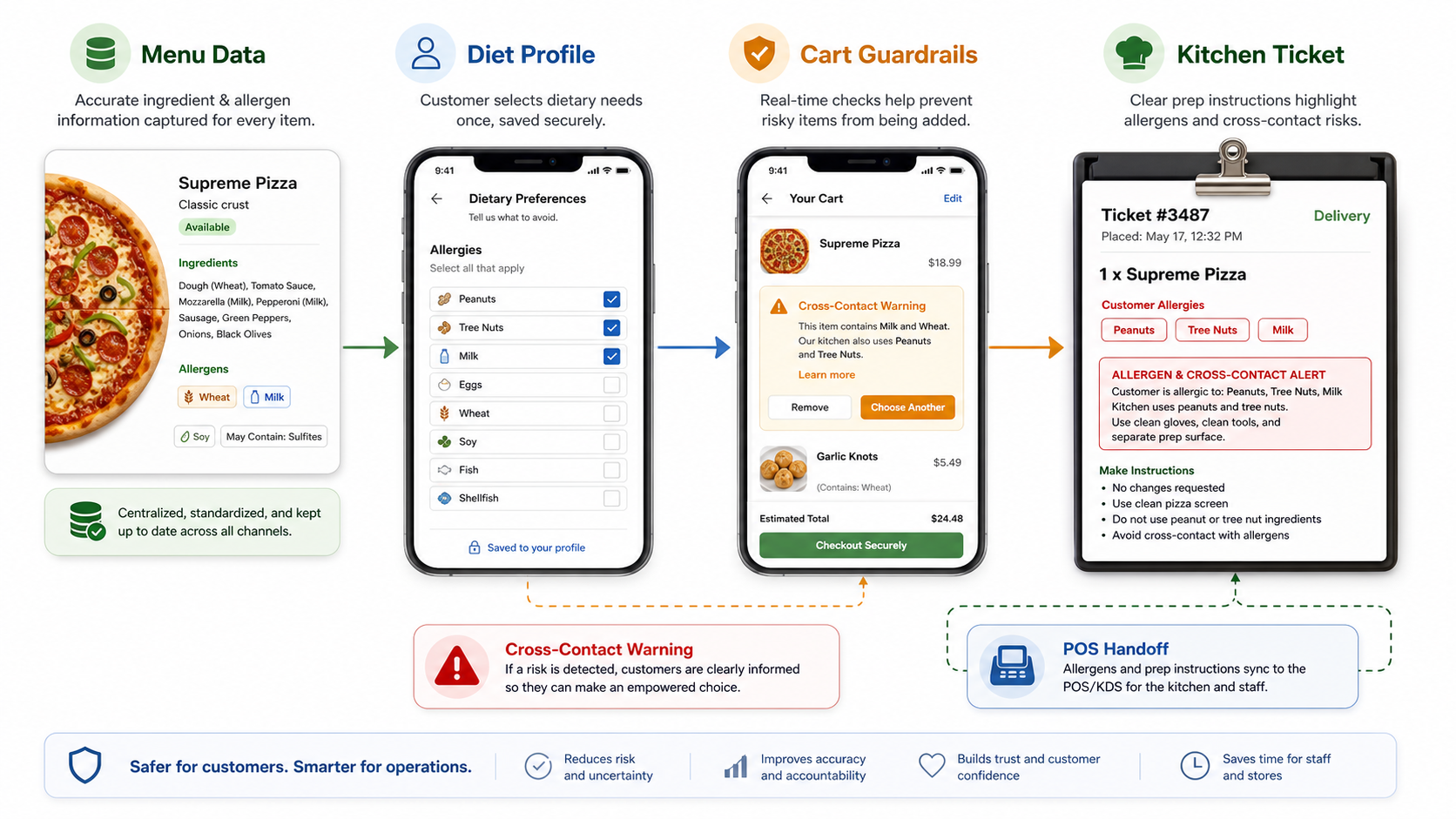
A safer ordering flow starts before the customer reaches the cart. The menu should show dietary labels and allow filtering. The product builder should warn when a topping, sauce, crust, or add-on conflicts with the selected profile. The cart should summarize dietary flags and require confirmation for risky combinations. The kitchen ticket should make the final preparation instruction visible to staff.
Free-text notes still have a place, but they should not be the primary safety mechanism. A note such as "no dairy" can be missed, misunderstood, or dropped during a POS handoff. Structured options are easier to test, translate, report on, and connect to restaurant operations.
Apps that support multiple locations need an additional layer: location-specific availability. A gluten-free crust or vegan cheese may be available in one store and unavailable in another. The app should avoid showing choices the kitchen cannot fulfill.
Personalization Without Losing Customer Control
Personalization can improve dietary ordering when it respects explicit choices. A returning customer might want the app to remember a gluten-free crust, dairy-free cheese, favorite toppings, spice level, portion size, and preferred store. The app can then surface safe reorders, recommend compatible add-ons, and reduce checkout friction.
The risk is over-automation. Customers with allergies or strict dietary needs should always be able to review, edit, and override recommendations. The app should clearly separate hard restrictions from soft preferences. "No peanuts" is not the same as "usually orders vegetarian."
For brands exploring AI-driven recommendations, start with reliable rules and measurement before adding advanced ranking. NextPage's AI development services can help with recommendation systems, but the foundation is still product design, clean data, and operational guardrails.
Feature Roadmap For Pizza Delivery Apps
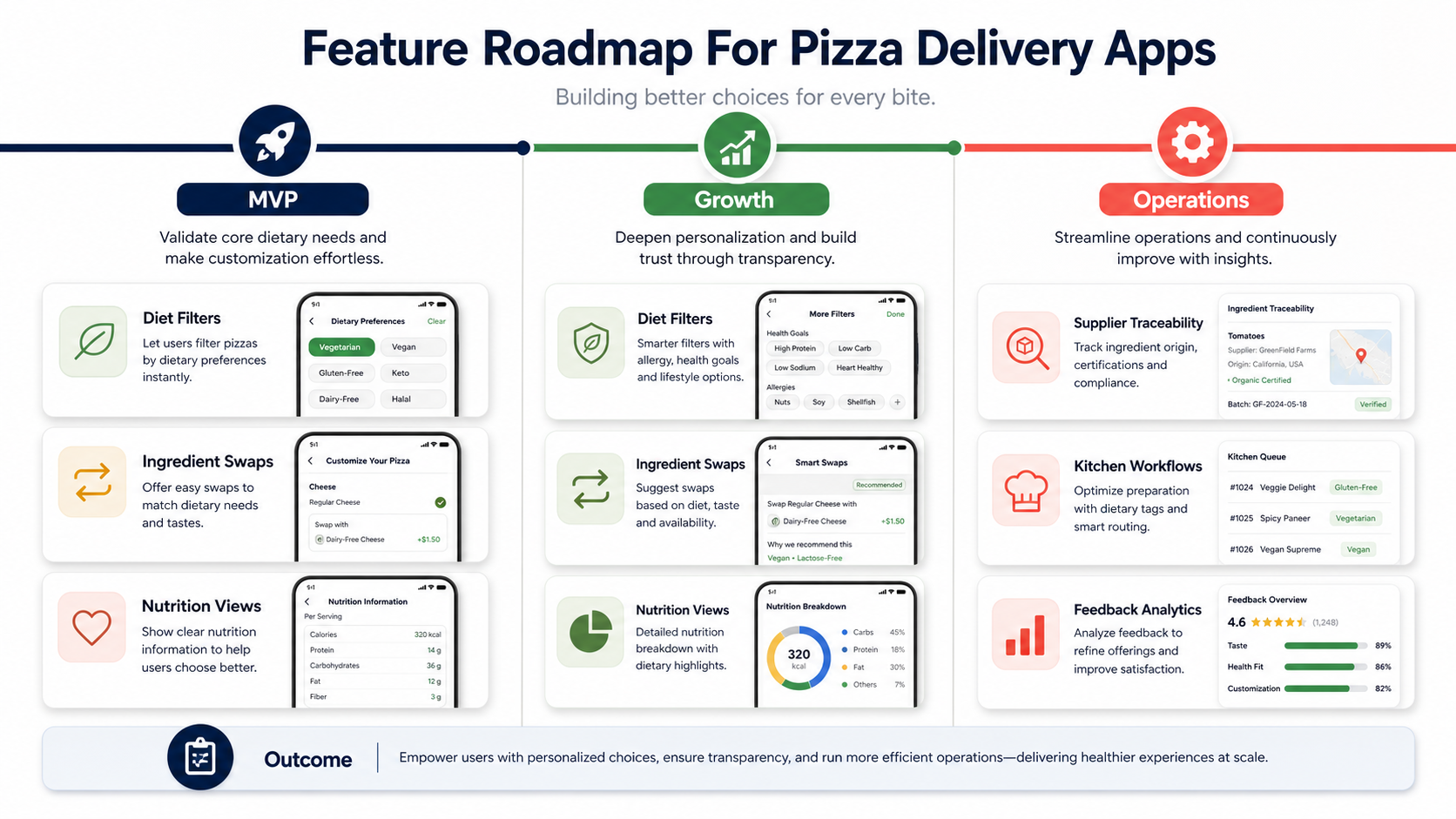
A practical roadmap starts with the features customers need to make a safe decision. The first release should include dietary filters, ingredient toggles, clear labels, saved favorites, and checkout summaries. The next stage can add smart substitutions, personalized bundles, nutrition views, and feedback analytics. Mature operations can add supplier traceability, menu governance, kitchen workflows, and experiment controls.
This staged approach keeps the project realistic. A pizza delivery app does not need every advanced feature on day one. It needs a reliable path from menu data to customer choice to kitchen fulfillment. Teams deciding between a packaged platform and a custom build can use the Build vs Buy Decision Tool to compare control, speed, integrations, and long-term operating cost.
Internal Tools Restaurant Teams Need
Dietary customization is not only a customer app feature. Restaurant teams need admin screens for ingredient attributes, allergen updates, supplier changes, store availability, substitutions, and temporary stockouts. They also need analytics that show which dietary filters are used, which swaps cause confusion, and which stores receive the most allergy-sensitive orders.
For multi-location brands, the admin workflow should include approvals. A local manager may update availability, but brand-level dietary labels should be governed carefully. This reduces the risk of inconsistent customer experiences across stores.
When the same ordering logic must support web ordering, mobile apps, admin dashboards, and kitchen displays, web app development and API design become just as important as the consumer mobile interface.
How NextPage Can Help Build This
NextPage can help food and restaurant businesses define the right scope for dietary customization, design the ordering workflow, build the customer app, connect POS or kitchen systems, and create the admin tools needed to maintain menu data. The goal is not to add complexity. It is to make dietary choices understandable, repeatable, and operationally feasible.
If you are planning a broader food ordering platform, supporting articles such as Benefits Of Food Delivery App Development, Essential Features For Your Pizza Delivery App, and How To Develop A Pizza Delivery App Like Domino's can help compare dietary customization against the wider product roadmap.
For custom ordering systems that need owned workflows, integrations, and long-term control, NextPage's custom software development team can turn the dietary customization model into a maintainable product.