
Quick Answer: Education App Development Cost
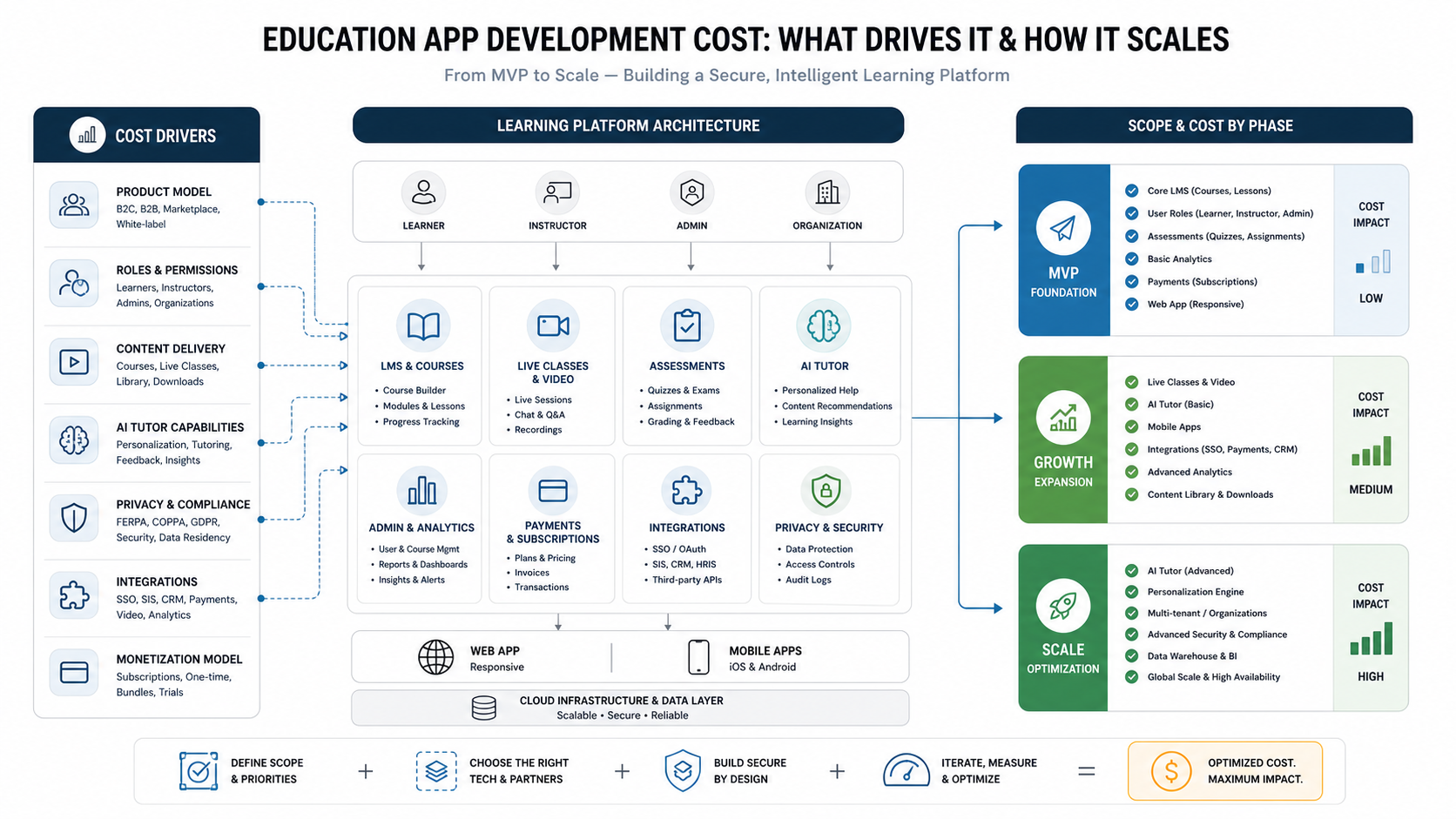
Education app development cost usually depends less on the word "education" and more on the product model you are building. A simple content-and-quiz MVP can start around $30,000 to $60,000. A stronger LMS or tutoring app with learner profiles, admin workflows, payments, analytics, live sessions, and mobile apps often lands around $70,000 to $180,000. A full learning platform with AI tutor features, multi-tenant schools or companies, complex integrations, privacy controls, custom reporting, and scale planning can move beyond $200,000.
The best way to control the budget is to decide which learning outcome the first release must prove. An EdTech founder may need paid learner acquisition and subscription retention. A school may need secure class delivery, assignments, parent access, and student privacy controls. A training company may need cohorts, certificates, content reuse, and reporting for business clients. Those are different products, even when every pitch deck calls them an education app.
If you already have a rough feature list, run it through the Custom Software Cost Estimator before asking for a build quote. It helps separate product type, feature complexity, user roles, integrations, and AI features so your education app estimate is easier to defend.
Education App Cost Bands by Scope
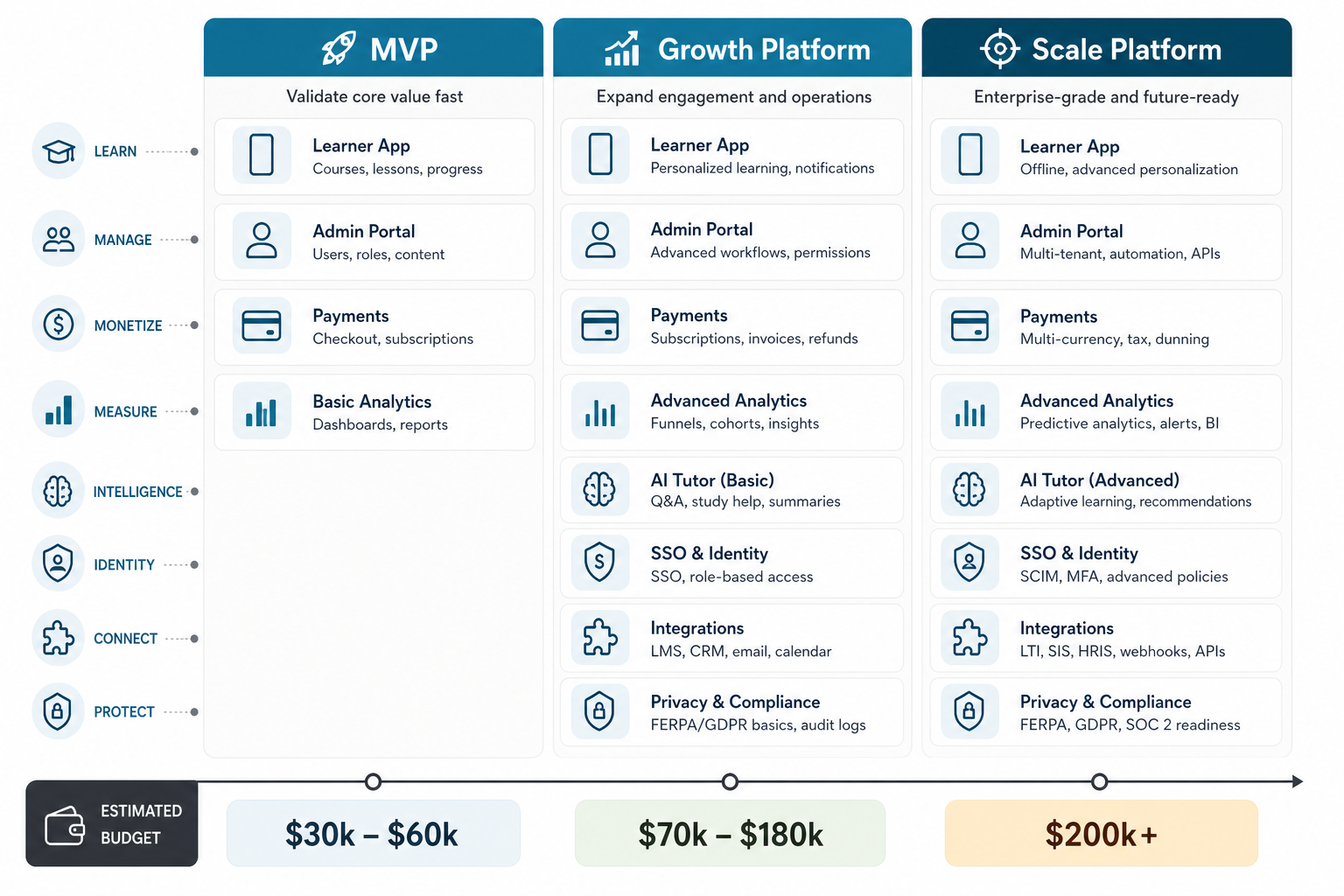
Public cost guides often give a wide range because they mix small learning apps, LMS products, tutoring marketplaces, live-class platforms, corporate training portals, and AI-enabled products into one category. For planning, it is more useful to group the budget by release stage.
| Build stage | Typical scope | Directional budget | Best for |
|---|---|---|---|
| MVP | Core learner app or web portal, course catalog, lessons, quizzes, basic progress, admin content management, simple notifications | $30,000-$60,000 | Testing one learning model, one audience, and one monetization path |
| Growth platform | Mobile apps, web dashboard, roles for students/instructors/admins, payments, live sessions, assignments, certificates, analytics, integrations | $70,000-$180,000 | Launching a commercial EdTech product, school portal, or training platform |
| Scale platform | Multi-tenant LMS, AI tutor or personalization, advanced reporting, SSO, SIS/CRM/payment integrations, privacy workflows, high availability, data warehouse | $200,000+ | District, enterprise, marketplace, or venture-backed product builds |
These bands are directional, not fixed quotes. They change with region, team model, content complexity, compliance needs, launch timeline, and the amount of existing infrastructure you can reuse. The important point is that cost rises when the app needs more roles, more permissions, more integrations, more data controls, more content formats, and more review workflows.
Choose the Education App Model Before Estimating
The product model decides the architecture. A course library is not the same as a tutoring marketplace. A school LMS is not the same as a corporate training portal. An AI tutor is not just a chat window added to lesson pages.
| Product model | Core build requirement | Cost driver |
|---|---|---|
| Self-paced learning app | Content library, learner accounts, quizzes, progress, subscriptions | Content formats, offline mode, recommendation logic, app-store release |
| LMS or school portal | Classes, assignments, grades, teacher/admin workflows, reports | Roles, permissions, student privacy, integrations, audit history |
| Tutoring marketplace | Tutor profiles, search, booking, messaging, payments, reviews | Scheduling, payouts, trust/safety, cancellation logic, live sessions |
| Cohort-based platform | Enrollment, cohort calendar, live classes, assignments, community, certificates | Video, notifications, admin operations, learner engagement analytics |
| AI tutor or adaptive learning app | Private knowledge, learner state, recommendations, guardrails, evaluation | Data quality, LLM/RAG design, model monitoring, safety review, cost controls |
| Corporate training portal | Teams, departments, compliance courses, reporting, SSO, certificates | Multi-tenant reporting, integrations, role hierarchy, data export needs |
For a focused first release, use the MVP Scope Builder to separate must-have learning workflows from later-phase features. It is common to launch with one audience, one course format, one payment model, and one admin workflow before adding marketplaces, AI, mobile offline mode, or enterprise dashboards.
Feature Cost Drivers in an Education App
Education apps usually become expensive when teams underestimate the operational workflows around the learning experience. The visible lesson screen may be simple. The hard work often sits behind it: content authoring, versioning, enrollment, assessment logic, permissions, reporting, notifications, payments, privacy controls, and support tools.
- User roles: students, parents, instructors, coaches, admins, school owners, corporate managers, and support teams each need different permissions.
- Content delivery: video, audio, PDFs, SCORM packages, live classes, downloadable resources, interactive exercises, and multilingual content add different technical constraints.
- Assessment: quizzes are simpler than proctored tests, rubric grading, assignments, peer review, portfolios, or adaptive practice.
- Progress tracking: basic completion is cheaper than skill maps, cohort analytics, parent dashboards, certificates, and compliance reports.
- Monetization: subscriptions, one-time course purchases, bundles, school contracts, coupons, tutor payouts, and invoices all affect payment architecture.
- Notifications: class reminders, missed-work nudges, instructor messages, parent alerts, and certificate updates need clean event logic.
- Admin operations: content management, learner support, refunds, bulk enrollment, content moderation, and reporting can decide whether the product is manageable after launch.
If the app is mobile-first, work with a team that scopes the learner experience, backend, admin panel, and release pipeline together. NextPage's mobile app development process is built around product stage, target devices, integrations, and long-term maintenance rather than a one-size-fits-all stack.
LMS, Web App, and Admin Portal Scope
Many education products are not only mobile apps. The learner may use iOS or Android, but teachers, content managers, school admins, tutors, and operations teams often need a web dashboard. That makes education app development a multi-surface product: mobile experience, web app, backend APIs, admin tools, reporting, and content operations.
An LMS-style web platform may include course builders, lesson scheduling, class groups, assignment review, gradebook exports, certificates, learner segmentation, attendance, discussion moderation, and institution-level reporting. These are not decorative features. They are the workflows that let educators or training teams operate the product without calling engineering every week.
For LMS, portal, dashboard, and SaaS-style builds, NextPage's web app development work is often as important as the mobile app. A browser-based admin surface can reduce release friction, support bulk operations, and make reporting easier for schools, tutors, and corporate training buyers.
How AI Tutor Features Change the Budget
An AI tutor can make an education app more useful, but it changes the product plan. A safe AI tutor needs more than a model call. It needs learning objectives, approved content sources, learner context, age-appropriate responses, escalation rules, evaluation data, analytics, and cost controls. If the tutor will answer from proprietary course material, the platform may also need retrieval-augmented generation, content indexing, permissions, and response monitoring.
AI features usually fall into three budget levels. The first is simple assistance: lesson summaries, quiz explanations, flashcard generation, or instructor content drafts. The second is personalized learning: recommendations, practice paths, weak-area detection, and adaptive review. The third is a tutor-like workflow: conversational help, context memory, guardrails, teacher/admin visibility, and integration with assessments or learning records.
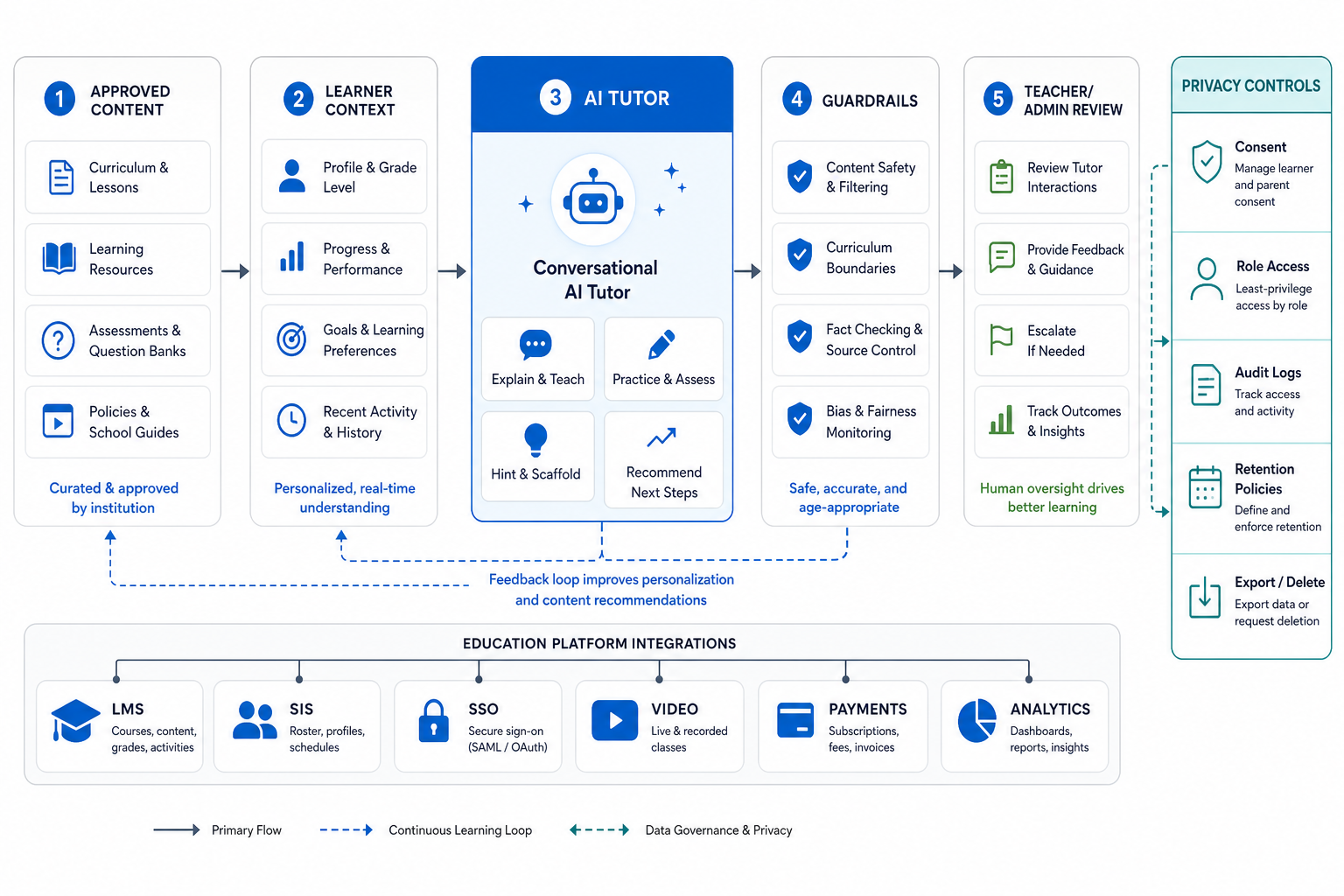
If AI tutoring is the main product bet, compare this cost plan with the AI tutor app development roadmap so retrieval quality, evaluation data, teacher oversight, learner safety, and LMS integration are scoped before sprint planning.
For production AI, use AI development services when the product needs private knowledge, evaluation, integrations, governance, and monitoring. Use machine learning development when the app needs recommendation, personalization, ranking, prediction, or learning analytics from structured behavior data.
Privacy, Compliance, and Student Data Planning
Education apps often touch sensitive learner data: names, ages, contact details, grades, attendance, messages, assignments, assessment results, behavioral analytics, payment details, and sometimes parent or school records. Privacy planning should happen before engineering starts because it affects data collection, consent flows, retention, access control, vendor contracts, logging, exports, and support workflows.
For U.S. school and district contexts, the U.S. Department of Education's Student Privacy Policy Office administers and enforces student privacy laws such as FERPA and PPRA and provides school-focused privacy resources. FTC guidance on education technology and COPPA also matters when services collect personal information from children under 13; in school-authorized contexts, school consent may be possible only for educational purposes, and companies still need appropriate notices, limits on use, retention controls, and reasonable security.
Practically, this means your education app scope should include role-based access, audit logs, secure authentication, student/parent visibility rules, data export and deletion workflows, vendor review, encryption, privacy notices, and least-privilege admin tools. This article is not legal advice, but it is a warning against treating privacy as a policy page added after launch.
Integrations That Change Education App Cost
Integrations are one of the biggest budget swings. A standalone learning app can be straightforward. A school, tutoring, or corporate platform may need to connect with identity providers, student information systems, learning tools, video providers, payment gateways, CRMs, marketing tools, analytics, helpdesk software, and data warehouses.
| Integration type | Common examples | Why it affects cost |
|---|---|---|
| Identity and access | SSO, Google/Microsoft login, school accounts | Permissions, user provisioning, institution rules, security review |
| Learning systems | LMS, SIS, gradebook, course import/export | Data mapping, standards, sync failures, audit needs |
| Video and live class | Zoom-style sessions, streaming, recording, whiteboards | Scheduling, attendance, bandwidth, recordings, moderation |
| Payments | Subscriptions, course purchases, invoices, tutor payouts | Taxes, refunds, coupons, marketplaces, accounting exports |
| Analytics and CRM | Learning analytics, sales CRM, marketing automation | Event tracking, attribution, privacy rules, dashboards |
When integrations become central to the product, compare the estimate against broader web app development cost and SaaS application development cost planning. Education platforms often behave like SaaS products once they support institutions, teams, subscriptions, dashboards, and reporting.
MVP vs. Full Education Platform
A strong MVP should prove the learning promise with the smallest operational surface that can work in real life. For many education products, that means one learner type, one content model, one assessment pattern, one admin workflow, and a limited reporting set. It does not mean ignoring architecture. It means postponing features that do not prove acquisition, learning value, retention, or revenue.
Good MVP candidates include a course library with progress tracking, a tutoring booking flow for one subject category, a cohort platform for one program, or an AI-assisted practice workflow for one skill area. Features to postpone often include multi-school tenancy, complex marketplace payouts, advanced AI tutoring, offline mobile sync, custom white-labeling, and deep SIS integrations.
If the first release must win real users but avoid overbuild, a focused MVP development plan can define launch scope, later-phase items, technical risks, and a clean path from first release to scalable product.
Team, Timeline, and Delivery Plan
A typical education app build needs product strategy, UX/UI design, frontend engineering, backend engineering, QA, DevOps, and project management. AI-heavy products may also need data engineering, AI engineering, evaluation design, and security review. The timeline depends on the number of product surfaces and integrations, but many serious MVPs take 10 to 16 weeks, while growth platforms often take four to eight months.
Do not estimate timeline from screens alone. A few screens with complex roles, live-class scheduling, payment rules, privacy workflows, and admin reporting can take longer than a larger-looking app with simple logic. The delivery plan should include discovery, clickable prototype, technical architecture, sprint plan, test strategy, release plan, content migration, analytics, and post-launch support.
The existing NextPage guide on online education apps is a useful companion if you are still comparing education app models, learner experience patterns, and MVP tradeoffs before writing the final specification.
How to Reduce Education App Development Cost Without Weakening the Product
Cost control should come from clearer sequencing, not from cutting quality. The safest savings usually come from narrowing the first release, using stable third-party infrastructure where appropriate, reducing role complexity, shipping web admin before advanced mobile admin, and proving the learning model before custom AI.
- Pick one learner segment first. Avoid building for children, parents, tutors, schools, and enterprises in the same MVP unless that complexity is the business model.
- Use one content format first. Video plus quizzes is easier than video, live classes, PDFs, SCORM, interactive simulations, and AI-generated exercises at once.
- Limit integrations. Start with payments and analytics before adding every SIS, CRM, SSO, and data warehouse request.
- Design admin workflows early. Poor admin tools create expensive manual operations after launch.
- Use AI where it changes outcomes. Add AI tutor features after you know the lessons, assessments, and support questions that matter.
- Plan compliance up front. Retrofitting permissions, consent, audit logs, and deletion workflows is more expensive than designing them into the data model.
Education App Estimation Checklist
Before asking for a proposal, prepare a short brief with these answers:
- Who are the primary users: students, parents, teachers, tutors, admins, schools, companies, or content creators?
- What learning outcome should the first release prove?
- Will the product be mobile-only, web-first, or both?
- What content formats are required at launch?
- Which assessments, grading, certificates, or progress reports are mandatory?
- What privacy, age, school, or enterprise constraints apply?
- Which integrations are essential for launch and which can wait?
- Does the product need AI now, or should AI follow after learning data exists?
- What monetization model needs to work in version one?
- What admin workflows must exist so the team can operate the platform?
With those answers, an estimate becomes a product plan rather than a guess. NextPage can help turn that plan into a phased build: discovery, MVP scope, architecture, design, development, QA, launch, and post-launch iteration.
How NextPage Helps Plan Education App Builds
NextPage plans education apps around the learning workflow, not just the feature list. We map user roles, course/content structure, assessment logic, privacy constraints, integrations, admin operations, analytics, and launch goals before choosing the technical path. That gives founders and operators a clearer way to decide what belongs in the MVP and what should wait.
For a cost-first discussion, start with your desired product model, target users, launch goal, content format, and must-have integrations. From there, the right first release might be a learner app, an LMS portal, a tutoring marketplace, a cohort platform, an internal training product, or a controlled AI tutor pilot.
For proof patterns, review NextPage education platform case studies such as NumerixIQ for adaptive K-8 learning workflows, LessonBridge for tutoring marketplace operations, and PathForge for coding education LMS and curriculum operations.
If you want a practical next step, estimate the first release before writing a long specification. The estimator will give you a directional range, timeline band, complexity level, likely team shape, assumptions, and next steps you can review with a delivery team.